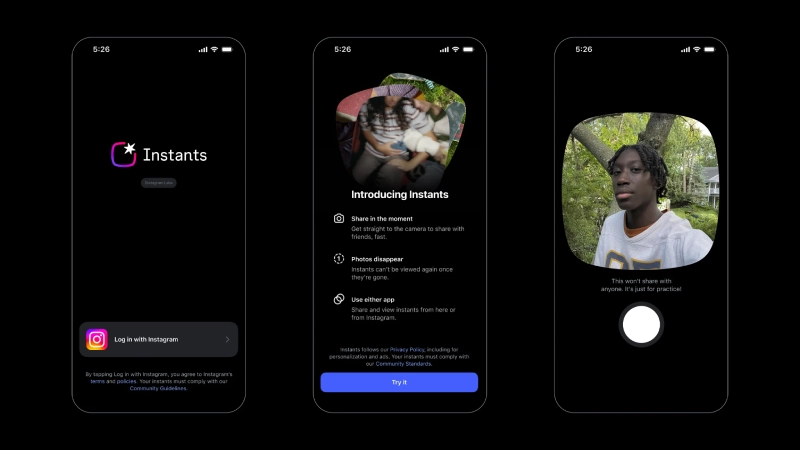
Meta announced a new Instagram feature, Instagram Instants, on May 13, 2026. It gives users a faster way to share spontaneous, unedited photos with friends, close friends, and mutual followers. The feature is available globally inside Instagram, while the standalone Instants app is available in select countries.
“With Instants by Instagram, you can access your camera to take a photo and instantly share it with a group of people that you choose – either Close Friends or friends (followers you follow back). Photos that you share using Insta will also appear in your inbox on Instagram”, as announced by Instagram officially.

Instants works as a private sharing tool where the photos disappear shortly after being opened and cannot be viewed after 24 hours. The feature is added to provide a simpler, more spontaneous way for users to interact with close friends and mutual followers. The update is further available globally as an Instagram feature; the standalone app is rolling out in select countries on iOS and Android. It gives users direct access to the camera experience.
How does the Instagram Instants feature work?
Users can access Instagram Stories in the direct message inbox, via a small stack-like photo icon. To get started:
- One will need to sign in with an Instagram account to use the Instants app.
- Allow the app’s access to your device’s camera.
- To access it within the Instagram app, one will have to tap the mini pile of photos at the bottom right corner of their Direct Messages and try it themselves.
How to share a photo with the Instants app?
- First, open the Instants app.
- Before sharing, users can add a caption, switch cameras, and choose their audience:
- Add a caption: Tap Add a caption to include text with your photo.
- Rotate your camera: To rotate your camera settings, tap the Rotate option at the bottom right.
- Choose your audience: Tap Close Friends or Friends at the bottom and then tap a group from the list. Your close friends and friends will remain the same ones you chose on your Instagram account.
- When you are ready with the settings, tap the Camera option to take the photo. By doing this, your photo will be instantly shared with the others that you have allowed access to on Instagram and will also appear in their inbox on Instagram. If you have accidentally shared an Instant, you can tap the Undo button below the Camera option.
How to View and Interact with Instants?
When you and others share an Instant, you can see a preview of it with a numbered notification in the top right. You can tap the preview button to view Instants that have been shared by others. Each Instants can be viewed only once. An instant on the Instants app or Instagram cannot be seen again by that account once it expires. Within 24 hours of being shared, your Instants can be accessed and viewed by others.

You can respond to or react to images posted with Instants using emojis. If you react to an Instant, the person who shared the photo will receive a notification. However, if you respond to the photo with a text, it will be sent as an Instagram message between you and the recipient. If a photo shared with Instants does not align with Meta’s Community Standards, then you can report it by tapping and holding someone’s username and then tapping the Report option.
How to Manage Your Instants?
By selecting the Archive option in the upper right corner, users can view an archive of pictures, which are saved in a private archive that only the user can see for up to one year. You can find more information about a photo that you have shared via Insta by tapping on it. These details include the time the photo was shared, the list it was shared with, and the list of people who have reacted and responded to the photo.
Tap More in the upper right corner of the photo to find the options for deleting or saving a photo that has been taken by Instants. It will unshare instantly when you remove it from your archive. It would not be visible to anyone who has not opened it yet.
By selecting the Create Recap option, you can share your instants from your archive as a recap in your stories. By default, your Instants are automatically saved to your phone’s camera roll. Tap your profile photo, select Settings in the top left corner, tap Save to photos, then toggle the switch next to Save Instants to photos to turn off saving Instants to your device.
Additional Features included in Instants
- Users cannot take screenshots or record Instant messages shared through the feature. However, users should share with only trusted people, as another device can capture the screen.
- Photos taken with Instant cannot be edited.
- Information about who viewed the Instants you shared is not available.
- Your instances must comply with Meta’s Community Standards.

What this means for Instagram Users
Instants show Instagram moving further toward private, low-pressure sharing instead of polished public posts—the feature overlaps with the behavior that made Snapchat, BeReal, and private Stories popular. Still, Instagram has an advantage because it already has users’ Close Friends lists and direct message networks.
For regular users, the main benefit is speed: take a live photo, choose a limited audience, and send it without editing. The main limitation is that the experience is photo-only and does not replicate Stories, Reels, or existing disappearing messages for users who want richer editing tools or broader visibility.
Source: Instagram Instants